App Storekeyword research
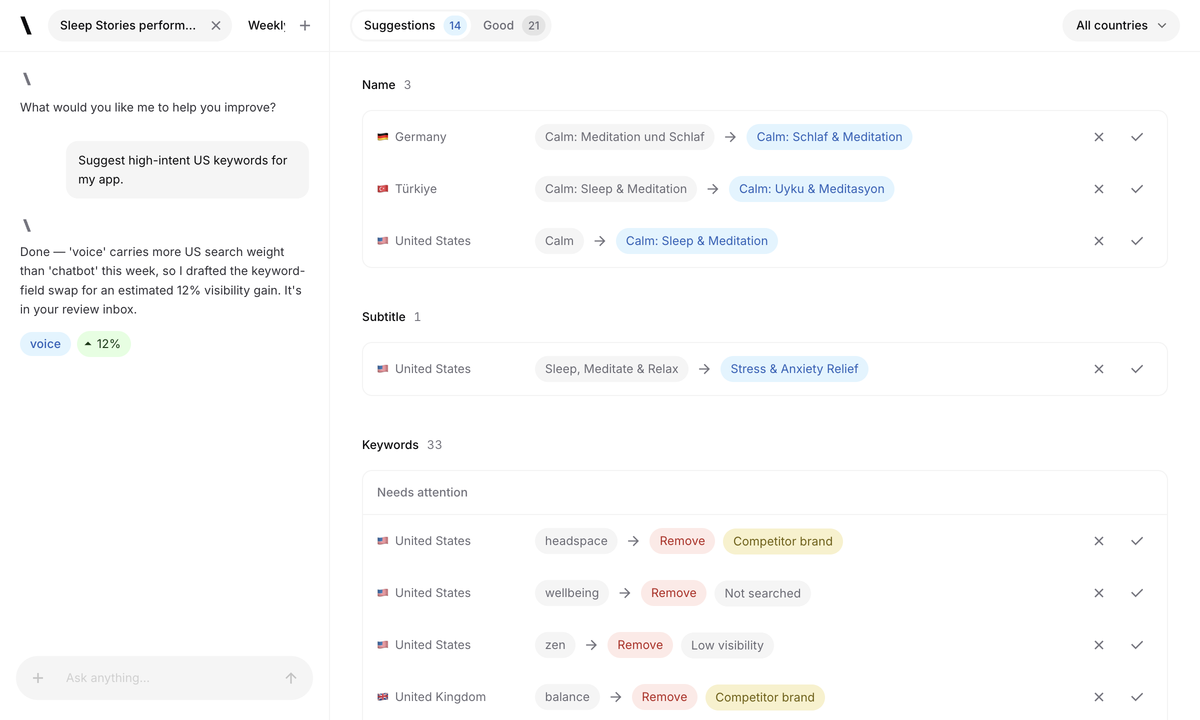
Start a run for your selected App Store or Google Play markets. Review keyword research and localized metadata proposals before accepting changes.
Spek helps over 500 apps grow. Across every stage of growth.
Start a run for your selected App Store or Google Play markets. Review keyword research and localized metadata proposals before accepting changes.
Review titles, subtitles, keywords and screenshots by locale. Publish approved drafts through your workspace’s App Store Connect key.
Prepare custom product pages and product page tests when your app is eligible. Review and submit each action separately.
Prepare event details, localized artwork and schedules. Review the event and its App Store eligibility before submitting.
“With Spek, we can turn keyword opportunities into listing updates in one place, with our team in control of what goes live.”

Spek takes care of the research and drafting behind your App Store and Google Play listings. When you start a run, it researches keywords, reviews competing apps, and prepares localized listing text for each store’s fields for your selected markets. Your team can review, edit, or reject each suggestion, then publish the changes you choose to your connected store. The useful result is a draft your team understands and can stand behind. Check the complete listing after applying individual proposals so the fields work together and describe features that users can actually access.
Spek connects the writing to your app and its market. It uses your current listing, store search results, keyword research, and competitor context to prepare changes for specific locales. Those changes arrive as reviewable proposals alongside your existing metadata, so your team can move from research to a draft and then to publishing in one workspace. Use the proposal context to judge the wording rather than accepting text only because it sounds polished. Product accuracy and local language remain part of your review, and a generated sentence is not an automatic store release.
Spek helps you discover ASO keyword opportunities for your app and selected markets. Suggestions arrive with market context and supporting estimates, so you can review the proposed wording and choose what fits your product. Your team can turn those suggestions into localized listing drafts in the same workspace. Compare estimates within the selected store and country, and keep the actual user need in view. A term with an attractive estimate is still unsuitable if it creates the wrong expectation about your app.
Choose up to five locales for an Agent run and set the brand name you want to protect. Spek researches each market and prepares localized proposals for your review. You can edit or reject suggestions before they reach your listing. Accepting a proposal only updates your draft; publishing remains a separate action that you control. Agree on who reviews each language and check the final draft in its local context. A consistent brand promise can use different wording across markets without forcing every storefront to share the same keyword choices.
You don’t need to write code. Connect your App Store or Google Play app, choose your markets and competitors, and start your first Agent run. Research, draft review, and publishing happen in Spek. For App Store Connect, you’ll need access to your own API key; your Apple ID password is never required. The documentation walks through the supported steps and explains the permissions that matter. Start with one app and a few markets so you can learn the review process before expanding the work across a portfolio.
Start with the app, store and market shown on the proposal. Read the current and proposed field values together, check the available keyword context and make sure the text accurately describes your product. Keep the brand language you need and edit wording that does not fit the audience. After applying a metadata proposal, inspect the complete draft in the Editor so separate fields read consistently. You do not need to accept every suggestion for the review to be useful, and publishing remains a separate decision after the draft is ready.
Yes. The Agent supplies researched proposals, and the Editor gives your team control of the resulting draft. You can accept a direction while revising the final sentence, keep existing wording that better represents the product or make a known correction directly. Check the selected locale and save state as you work. Before publishing, review the current provider values and any reported conflict so an earlier suggestion does not accidentally replace a newer decision made by another teammate or in the store console.
Use the appropriate client workspace and connected account, then manage each app's markets, competitors and drafts in its own context. Decide who reviews product accuracy, local language and the final publishing scope. A read-only stakeholder can follow the work without receiving the same permissions as the person responsible for edits. Keep the client's existing reporting available while new ranking history builds. Spek's workflow helps organize the research and review, but it does not replace the client's responsibility for the claims made in its public listing.
Read the publishing result and the provider's version or review state to establish what was accepted. The public store page can update at a different time from the editable provider record. As ranking observations accumulate, use Analytics to review the relevant keywords and market. Record what changed and when so the next review has a clear reference point. A rank increase is useful evidence about search presence, but it does not by itself show how many users installed, subscribed or stayed in the app.
Detailed App Store Connect setup, Apple's metadata fields, screenshot proposals, custom product pages and in-app event workflows retain their Apple scope. General Spek positioning covers App Store and Google Play ASO, but that does not make every store feature or field interchangeable. Read the guide for the specific action you intend to use and check the app's eligibility and provider state. For an unfamiliar Google Play integration requirement, discuss the intended workflow with the team rather than applying Apple credential or publishing instructions to a different store.
Judge the actual wording and its market context, not the number of proposals produced. If the current listing communicates the product clearly and a suggested change is less accurate, keeping the existing field is a valid decision. Review supporting estimates as inputs, not promises. You can also revise a proposal into a better draft before deciding to publish. A repeatable ASO process includes choosing what to preserve and allowing enough observation history to assess a previous update, rather than changing text merely because another run is available.
UNIVENN
“Spek turned hours of manual research into a system that keeps learning and pushing our growth forward.”

Spek helps over 500 apps grow. Across every stage of growth.
Customers