

01
Connect yourApp Store account
Bring your own App Store Connect key. Spek uses the official token API, so no Apple ID password or login is handed over.
Spek preview in front. Select the other card or its product name to bring it forward.
Spek helps over 500 apps grow. Across every stage of growth.
| Features | Spek | AppTweak |
|---|---|---|
| Agentic ASO with a proposal review inbox | Available | Not available |
| Agent proposals applied to Editor drafts | Available | Not available |
| App Store keyword research | Available | Available |
| Keyword rank tracking | Available | Available |
| Competitor keyword insights | Available | Available |
| AI metadata suggestions | Available | Available |
| Download and revenue estimates | Not available | Available |
| Apple Ads campaign management | Not available | Available |
| App review management | Not available | Available |
| Market share analysis | Not available | Available |
“With Spek, we can turn keyword opportunities into listing updates in one place, with our team in control of what goes live.”

01
Bring your own App Store Connect key. Spek uses the official token API, so no Apple ID password or login is handed over.
02
The agent researches each market in its own language and drafts the changes with the visibility lift it expects.
03
Push the changes you accepted straight to the App Store or Google Play, in each market and language you selected.
Let Spek research opportunities and prepare listing changes for you to review.
Find keywords for your app across the App Store and Google Play.
Adapt your listing for each market with localized drafts you can review and edit.
Follow daily keyword positions and see how your search visibility changes over time.
See which apps compete for your keywords and compare their search visibility.
Accept the changes you want, then publish your approved update when you’re ready.
If you’re comparing Spek and AppTweak, your team may already know what good ASO research looks like. The harder question is what happens after the research: who chooses the changes, writes the localized copy and gets the next listing ready for approval?
Both products bring AI into ASO. AppTweak offers a broad research platform and its own AI agents, including an ASO Agent that recommends metadata. Spek focuses on connecting research, localized proposals, a review inbox and editable drafts.
The useful comparison is how each workflow fits your team. A specialist investigating a competitive category, a founder preparing a release and an agency coordinating several editors may value different parts of the process.
We’ll look at those decisions from keyword discovery through review and measurement. Use an app you know well, so you can judge whether the recommendations make sense for the product you actually ship.
Start a research run for selected markets and review proposed listing changes in an inbox.
Apply accepted proposals to Editor drafts, refine the wording and decide when to publish.
Review localized suggestions alongside the keyword opportunities behind the next update.
Discuss your app’s ASO work and ask follow-up questions before deciding what to use.
Explore keywords, competitors and store performance in a dedicated research suite.
Its ASO Agent analyzes opportunities and suggests localized metadata. Other agents support areas such as reporting and reviews.
AppTweak also offers market intelligence, reviews tooling and Apple Ads management, with access depending on the product and plan.
Spek is worth evaluating when your priority is a connected proposal-to-draft process. AppTweak is worth evaluating when a wider research toolkit and its associated growth products are central to your team’s responsibilities.
A keyword can look promising and still be a poor choice for your listing. It may describe a feature you don’t offer, attract the wrong audience or require wording that weakens your main message. Research needs product judgment before it becomes copy.
AppTweak provides keyword discovery, competitor research and performance analysis. Its ASO Agent can also investigate gaps and prepare metadata recommendations. That gives teams both research tools and an AI-assisted way to interpret what they find.
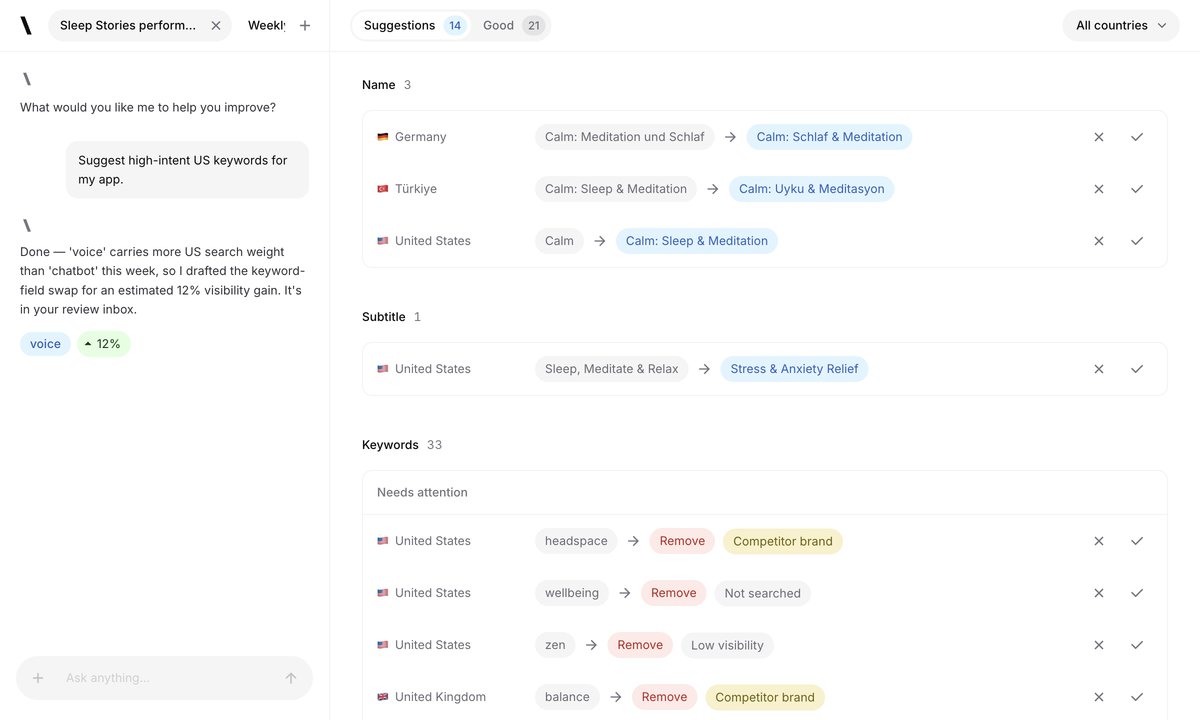
In Spek, you select relevant markets and competitors, then run the Agent to prepare proposals. For an App Store listing, a suggestion can become a change to the name, subtitle or keyword field that your team reviews before applying.
Take a habit-tracking app as an example. A phrase around daily routines may be relevant, but the reviewer still needs to decide whether it expresses the product’s main value. Compare the proposed copy with the current listing and check what useful language would be displaced.
During an evaluation, follow one opportunity through the whole process. Keep a record of the decisions you made and the work needed to reach a draft. That will show whether the tool fits the way your team researches and writes.
AppTweak has AI agents, so choosing between these products should not come down to whether an agent exists. Its documentation describes an ASO Agent that produces recommendations and metadata variants without automatically changing your account. Access to that agent is currently part of its Enterprise offering.
Spek’s Agent places proposed changes in a review inbox. You can inspect the suggestions, ask questions in Agent chat and apply the changes you choose to Editor drafts. The practical question is whether that sequence makes your next update easier to prepare.
Check whether the wording fits the app, its audience and the selected market.
Notice whether the reviewer can understand the proposal without repeating all the research.
Follow an accepted suggestion into the place where your team makes its final edits.
Give both tools a realistic task with the same product constraints. A polished answer is helpful, but the real test is the quality of the draft your team is willing to approve.
Localization involves more than translating a successful English listing. Search language, customer expectations and the features available in a region all affect the wording you should use. A literal translation can miss the reason someone would choose your app.
AppTweak’s ASO Agent considers the selected store, country and language when recommending metadata. Spek prepares localized proposals for the markets selected for a run. Both approaches should be evaluated with someone who can assess the language and the product promise.
For a habit app entering Japan and Germany, ask the reviewer to check whether the copy communicates the same useful outcome naturally. Keep established brand terms where they matter, and avoid adding a feature claim simply because a related keyword looks attractive.
Include one familiar market in your evaluation. It gives you a reference for judging the suggestions, while a newer market exposes the amount of local review you still need. Then assess how easy it is to make those corrections and keep each draft ready for the release team.
The person who researches keywords may not be the person who approves the listing. Good tooling needs to support that handoff without making the release owner reconstruct the entire discussion.
In Spek, reviewing a proposal, applying it to a draft and publishing are separate actions. Accepted changes remain editable in the Editor. An authorized team member starts publishing explicitly, so accepting a useful suggestion does not immediately change the live listing.
For App Store work, the listing’s state in App Store Connect also determines which updates can be sent. A prepared draft does not bypass Apple’s editing or review requirements. Plan your evaluation around the same release conditions your team normally works with.
AppTweak’s AI recommendations also leave decisions with the team. Ask to see how the recommended text reaches your final editing and release process. Compare the actual steps, ownership and remaining handoffs for the configuration you would use.
A useful trial includes a correction. Change a suggested phrase, ask another person to review it and confirm which version is ready to publish. That reveals more about collaboration than accepting every recommendation unchanged.
Your ASO report should answer a decision, not simply fill a dashboard. You may want to know which tracked terms improved, whether a market deserves more attention or whether a broader category offers room for investment.
Spek’s Analytics follows keyword positions, derived search visibility and competitor share of voice across your tracked keyword set. This helps your team decide where to investigate next. It does not measure installs, revenue or the causal effect of a listing change.
AppTweak combines ASO reporting with a wider product offering, including market intelligence for download and revenue estimates. Evaluate the specific reports and access you need, rather than assuming every number is included in the ASO package.
When you compare results, use the same store, country, keyword and observation period. Scores from separate platforms are not interchangeable. A difference between two dashboards may reflect their scope rather than a sudden change in your app.
Keep your own store and business reporting available during the evaluation. Search visibility helps explain where to investigate, while your acquisition and revenue data answer a different set of questions.
If ASO competes with product development for your attention, evaluate how much useful work reaches the review stage. Spek gives you proposals to assess and edit. Try completing a real update within the time you normally have available each week.
A specialist may want to investigate several explanations before choosing a change. AppTweak’s research tools and agents deserve a close look in that setting. Evaluate Spek around the preparation and review work that follows your research, using the same quality standards you already apply.
The main challenge may be keeping each client’s context and approvals organized. Spek’s separate workspaces keep apps, drafts, members and store credentials together. Include an editor and a viewer in the trial so you can assess how people with different responsibilities follow the work.
Bring the people responsible for paid acquisition, reviews and market analysis into the decision if those tools are in scope. An ASO workflow evaluation should not silently remove reporting or campaign capabilities another team relies on.
Spek publishes its prices upfront. With monthly billing, each workspace can choose from:
Up to 5 apps and 750 credits per month.
Up to 10 apps and 4,000 credits per month.
Up to 25 apps and 10,000 credits per month.
Tailored app capacity and credits.
AppTweak’s monthly ASO plans are Essential, $99/month; Grow, $359/month; and Grow Plus, $659/month. Enterprise uses custom pricing. Its ASO Agent is available on Enterprise, so include that requirement when requesting a quote.
These are monthly billing prices. AppTweak also displays lower monthly equivalents for annual billing. Compare the package that includes the research and agent access you need with Spek’s app capacity and credits.
Compare Spek plansThere may be a role for both products if your team has separate research and execution needs. Keep your existing reports while testing Spek: AppTweak account data and ranking history are not automatically imported. Judge the new workflow on the work you complete with it.
We built Spek to make the work after keyword discovery easier to move forward. An opportunity should lead to wording your team can inspect, improve and prepare for a release.
That is why proposals, editable drafts and explicit publishing sit together in the workflow. Your team supplies the product knowledge and final judgment; the Agent helps prepare the work for that decision.
Bring one app, a few markets and a real release task to the evaluation. Review the proposals with the people who would approve them. The resulting draft and the effort required to get there are the most useful evidence of whether Spek fits your team.
Spek is useful when your next bottleneck is acting on keyword research. An Agent run prepares localized proposals; your team reviews changes, applies them to drafts and starts publishing separately. Developers and agencies can use the same workflow for the apps they manage.
Yes. AppTweak documents agents that analyze store signals and recommend actions, including metadata options. Spek’s focus here is the connected research, proposal review and editor workflow. Compare those steps directly instead of choosing on the AI label alone.
Connect one App Store or Google Play app, choose a small set of markets and review one Agent run. Keep AppTweak available while comparing the research and review process. AppTweak account data and ranking history are not automatically imported.
Check your need for download and revenue estimates, Apple Ads management and reviews tooling. Spek’s Analytics measures keyword rankings and derived visibility. Those metrics do not replace acquisition attribution or revenue reporting.
Choose the same app and a small set of storefronts, then evaluate a complete task instead of comparing isolated metric screenshots. In Spek, inspect the researched proposal, review the before-and-after metadata and check how accepted wording moves into the Editor. Note the effort required from your team and the control available before publishing. Keep research coverage, workflow usability and business reporting as separate evaluation criteria, because one product may be useful for a particular stage without replacing every part of an existing toolset.
Check the store, country, keyword and observation context before comparing values. Similar labels do not establish identical definitions or coverage, so a difference in an estimate is not by itself proof that one product is wrong. In Spek, use the displayed evidence to review whether a term fits your app and the selected market. Keep your own product knowledge and language review in the decision. The final question is whether the proposed listing change is accurate and useful, not whether two dashboards display the same score.
Yes. Review a run, accept selected metadata into a draft and inspect that draft in the Editor. You can edit the wording, keep existing fields or decide not to publish the prepared update. This lets the team evaluate the handoff from research to review without treating generated copy as an automatic release. Store actions still require the relevant permissions and provider state. When you do choose to publish, review the exact field and locale scope and verify the reported outcome separately from the research result.
Keep historical reports, the definition of metrics your team relies on and a record of important listing decisions in your existing review process. Spek does not automatically import AppTweak account data or ranking history. New observations build for the markets tracked in Spek, so a tool change also changes the available historical context. If other services support advertising, revenue analysis or review management, evaluate those dependencies before removing them. A successful metadata-workflow pilot is evidence about that workflow, not every business process around the app.


