

01
Connect yourApp Store account
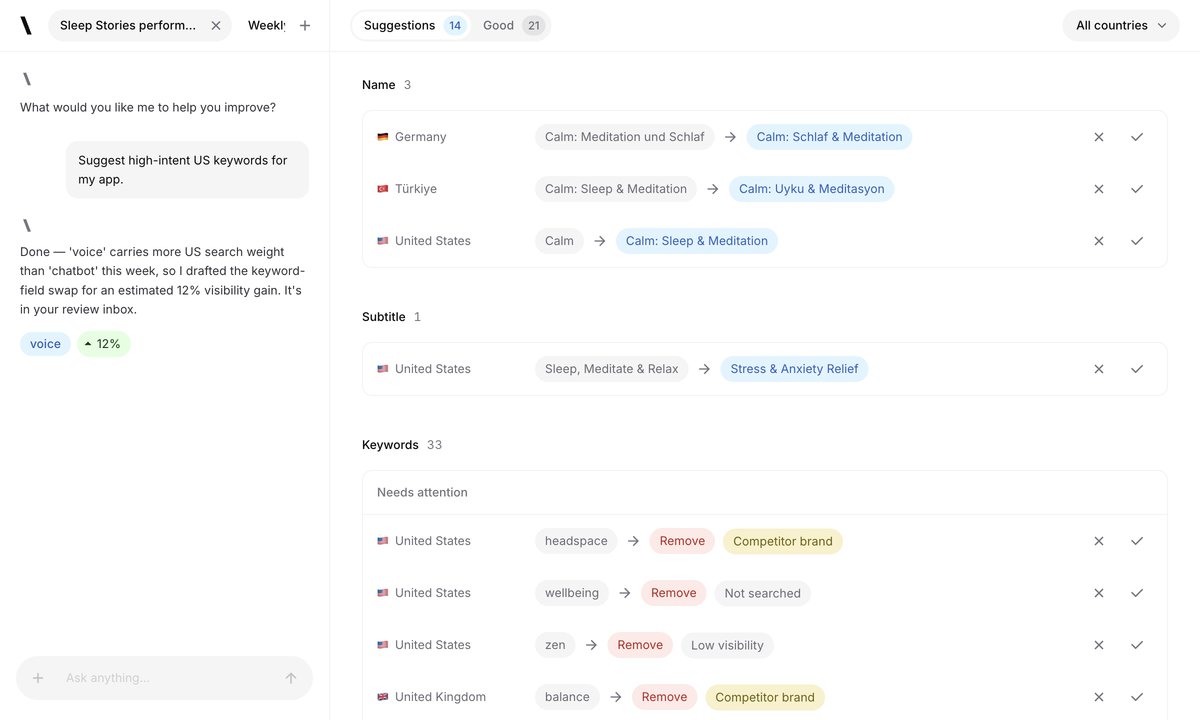
Bring your own App Store Connect key. Spek uses the official token API, so no Apple ID password or login is handed over.
Spek preview in front. Select the other card or its product name to bring it forward.
Spek helps over 500 apps grow. Across every stage of growth.
| Features | Spek | App Radar |
|---|---|---|
| Agentic ASO with a proposal review inbox | Available | Not available |
| Agent proposals applied to Editor drafts | Available | Not available |
| Research-to-publish workflow | Available | Available |
| Multi-market ASO workspace | Available | Available |
| Bulk listing localization | Available | Available |
| Direct App Store publishing | Available | Available |
| App Store keyword research | Available | Available |
| Keyword rank tracking | Available | Available |
| Competitor keyword insights | Available | Available |
| AI-assisted keyword discovery | Available | Available |
| Multi-market keyword research | Available | Available |
| Historical keyword rankings | Available | Available |
| Keyword search demand estimates | Available | Available |
| App review management | Not available | Available |
“With Spek, we can turn keyword opportunities into listing updates in one place, with our team in control of what goes live.”

01
Bring your own App Store Connect key. Spek uses the official token API, so no Apple ID password or login is handed over.
02
The agent researches each market in its own language and drafts the changes with the visibility lift it expects.
03
Push the changes you accepted straight to the App Store or Google Play, in each market and language you selected.
Let Spek research opportunities and prepare listing changes for you to review.
Find keywords for your app across the App Store and Google Play.
Adapt your listing for each market with localized drafts you can review and edit.
Follow daily keyword positions and see how your search visibility changes over time.
See which apps compete for your keywords and compare their search visibility.
Accept the changes you want, then publish your approved update when you’re ready.
If you’re comparing Spek and App Radar, you may be looking for a better way to manage ASO across several markets. Finding keywords is only one part of that job. Someone also needs to prepare the copy, review each localization and move the approved changes toward the store.
App Radar already supports listing editing, bulk localization and store export alongside keyword research. Spek connects research with an ASO agent, localized proposals, a review inbox and Editor drafts. Both products address work beyond a keyword report.
The choice depends on where your team needs help. You might have finished copy that needs to be managed across markets, or you might need the research and first draft prepared before an editor can begin.
This comparison follows that process from discovery to approval. Evaluate the handoffs using the people, markets and release conditions your team actually works with.
Start a research run and receive proposed listing changes for your selected markets.
Inspect suggestions in an inbox and choose which changes to apply to Editor drafts.
Discuss the work and ask questions before deciding what belongs in the listing.
Keep draft preparation separate from the authorized action that starts a store update.
Track rankings, investigate competitors and use AI-assisted keyword recommendations.
Edit metadata across localizations with a central listing editor and bulk update tools.
Use documented import and export workflows with connected stores, subject to their requirements.
Spek is a strong candidate when the research and proposed wording need to reach a reviewer together. App Radar is a strong candidate when listing management across markets is a major part of the task.
A new keyword opportunity should lead to a specific editorial question. Does the phrase describe the app accurately? Which part of the listing should communicate that benefit? What existing wording should remain?
App Radar provides keyword tracking, competitor insights and AI keyword recommendations. Its listing editor also makes regional keyword information available while preparing metadata, connecting research with the writing task.
Spek’s Agent prepares suggested changes for the markets and app context you select. For an App Store listing, those proposals can include the name, subtitle and keyword field. Your team decides whether the proposed wording fits the product before applying it to a draft.
Imagine a travel-planning app investigating searches around shared itineraries. The reviewer needs to check whether collaboration is available in the product, whether it is the right message for the target audience and how it fits alongside the app’s other benefits.
Use one opportunity like that in both evaluations. Follow it through research and copy preparation, then ask an editor to explain the final choice. The quality of that decision matters more than how many suggestions appear in the first search.
App Radar offers AI-assisted keyword discovery and other automation, so this is not a comparison between an AI product and a product without AI. The useful question is which work each tool prepares and how your team uses the result.
Spek’s Agent prepares metadata proposals in a review inbox. You can assess each suggestion, discuss the work in Agent chat and apply accepted changes to editable drafts. The workflow gives the reviewer a specific piece of copy to judge.
During a trial, compare three parts of the experience:
Does the wording describe the current app and make sense for the selected market?
Can the editor understand the suggestion and improve it without repeating the entire research task?
Can the release owner identify the draft that is ready for approval?
Include a suggestion you want to change. Useful assistance should leave room for your product knowledge and brand judgment. A smooth demonstration matters less than whether the workflow remains clear after a real editor has made corrections.
As the number of markets grows, localization becomes a coordination task as well as a writing task. Teams need to know which copy belongs to each locale, who has reviewed it and which changes are ready to use.
App Radar documents a listing editor for multiple localizations, bulk editing and CSV uploads. Those capabilities are useful to evaluate when your team already has copy or needs to coordinate updates across a larger set of listings.
Spek prepares localized proposals for the markets selected in an Agent run. The reviewer can inspect the suggestions and carry accepted changes into the Editor, giving the preparation work a defined review step.
For a travel app, local wording should reflect the services and destinations the product actually supports. A phrase that works well for international travel may be less appropriate for a market where the app mainly helps with domestic trips.
Test an established locale and a new one. Ask a local reviewer to correct the draft, then check how that correction reaches the release owner. Compare the full preparation and approval process, especially where several people edit different languages at the same time.
App Radar supports store export, so direct listing work is a shared capability in this comparison. Its help documentation explains that connections, app versions and store state affect the import and export process. Check the requirements for your actual store setup.
Spek separates proposal review, editing and publishing. Accepted proposals become drafts that your team can refine. An authorized member then starts publishing explicitly. Accepting a suggested change does not immediately update the live listing.
For App Store work, Spek’s publishing path also depends on the current listing state in App Store Connect. Preparing a draft does not bypass Apple’s editing rules or the review requirements that apply to your release.
The practical comparison is how each workflow handles your team’s handoffs. Ask an editor to change one phrase, have the release owner inspect the final version and check the market being updated before starting a publishing action.
Include a draft that must wait for the release team. The process should still make sense when research happens on one day and publishing happens later. Clear ownership is especially valuable when several markets are at different stages of review.
A localized update creates a follow-up question: what happened in that market afterward? Before answering, make sure the report covers the keywords, country and period relevant to the work you did.
Spek’s Analytics follows keyword positions, derived search visibility and competitor share of voice across your tracked set. It helps identify movements that deserve investigation as your team continues working on the app.
Visibility is scoped to those tracked terms. It is not a count of installs or revenue, and it does not establish that a particular edit caused a change. Use your store and business reporting to assess commercial outcomes separately.
App Radar’s keyword tools cover ranking history and competitor comparisons across markets. Evaluate the reports with your own research questions and check that the selected keywords and countries match the listings your team manages.
For a fair trial, choose the same market and observation period in both tools. Keep notes on the listing changes you made and any other activity that might affect performance. Different scores or datasets should not be treated as interchangeable measurements.
If you struggle to prepare the first draft, evaluate Spek on the quality of its proposals. Choose a real listing task and see whether you can complete the review in the time you normally have for ASO.
If the main task is managing copy across many locales, App Radar’s editor and bulk tools deserve a close look. Compare how the team handles existing text, corrections and release handoffs. Evaluate Spek for the research and proposal preparation that happens before those drafts are finalized.
Use an opportunity where the right wording is not obvious. Investigate it, prepare the change and explain it to another reviewer. That makes the trial a test of both research and editorial work, rather than a simple count of features.
Spek’s separate workspaces keep client apps, drafts, members and credentials together. Include editors and viewers in the evaluation, and test a real approval handoff. Your process needs to stay understandable when each client has different markets and release schedules.
Spek publishes its prices upfront. With monthly billing, each workspace can choose from:
Up to 5 apps and 750 credits per month.
Up to 10 apps and 4,000 credits per month.
Up to 25 apps and 10,000 credits per month.
Tailored app capacity and credits.
App Radar’s monthly plans are Essentials, €69/month; Growth, €169/month; and Scale, €299/month. Enterprise uses custom pricing. App, keyword and team allowances vary by plan.
These are monthly billing prices in euros, not the lower monthly equivalents shown for annual billing. Spek’s prices above are in US dollars. Compare the included workflow and allowances in the billing currency you will use.
Compare Spek plansYou can compare the two with the same app and a small set of locales before changing your wider process. Spek does not automatically import your App Radar account or ranking history. Retain the reports and approved copy you already use during the evaluation.
The hard part of localization is often reaching a decision that combines research, natural wording and accurate product claims. Spek helps prepare that decision with proposals your team can inspect and improve.
We connect the Agent’s work to drafts while leaving the final wording and publishing decision with your team. That makes review part of the process from the beginning, rather than an extra task after the research is finished.
Bring one app and a few markets to your evaluation. Let the people responsible for language and releases work through the proposals together. The quality of the approved draft, and the clarity of the handoff, will show whether Spek fits the way your team works.
Spek focuses on Agent-led research and field-level proposal review. Start a run for your selected markets, inspect the proposed changes and apply approved wording to Editor drafts before publishing.
Yes. App Radar documents listing updates, bulk localization workflows and store export. Those functions should be evaluated as shared capabilities. Spek’s distinction in this comparison is the connected Agent research and proposal workflow.
Choose a few locales that matter to your app. Spek researches each selected market before drafting metadata, and you can review the wording and brand usage per locale. An Agent run supports up to five locales.
No automatic import or synchronization takes place. Spek connects separately to your own store account. Connecting an app reads its context; publishing a listing change requires a separate authorized action.
Use the same app and locales, and give each workflow the same product and brand requirements. In Spek, inspect the local keyword context, the proposed field values and the way your team can edit accepted drafts. Check the final listing as a whole rather than judging only the fluency of one generated sentence. Listing management and store export are not exclusive Spek claims in this comparison. The useful distinction is how well the complete research, review and publishing process fits the people responsible for the release.
You can evaluate Spek separately while retaining the existing process, but coordinate who edits and publishes the same provider fields. Two tools can read a store listing without sharing a draft or an approval history. Connecting Spek does not automatically synchronize App Radar settings or import its account data. Before sending an update, review the current provider values and resolve any conflict. Clear ownership of the final publish helps prevent an older draft in either workflow from replacing a newer decision.
Agree on the brand wording and product promises that must remain consistent, then review each locale for natural language and audience fit. Spek's market-specific proposals can differ because the search and competitive context differs. That does not mean the product itself should make conflicting claims. Review accepted wording in the Editor and check it alongside other listing fields before publishing. For languages the team cannot confidently assess, arrange appropriate language review rather than assuming research estimates certify the quality of every phrase.
Follow a real task from the research request to a ready-to-publish draft and note where the team still needs to gather context, rewrite text or coordinate approval. Spek's Agent and review inbox are useful when they help people make a clear listing decision with less disconnected work. Count neither a generated sentence nor a saved draft as a completed release. Compare the workflow against your own baseline, and keep the accuracy of the result and control of the final store action as part of the evaluation.


