



01
Connect yourApp Store account
Bring your own App Store Connect key. Spek uses the official token API, so no Apple ID password or login is handed over.
Spek preview in front. Select the other card or its product name to bring it forward.
Spek helps over 500 apps grow. Across every stage of growth.
| Features | Spek | AppFigures |
|---|---|---|
| Agentic ASO with a proposal review inbox | Available | Not available |
| Agent proposals applied to Editor drafts | Available | Not available |
| App Store keyword research | Available | Available |
| Keyword rank tracking | Available | Available |
| Competitor keyword insights | Available | Available |
| Multi-market keyword research | Available | Available |
| Historical keyword rankings | Available | Available |
| Keyword search demand estimates | Available | Available |
| Keyword difficulty analysis | Available | Available |
| Download and revenue estimates | Not available | Available |
| App review management | Not available | Available |
“With Spek, we can turn keyword opportunities into listing updates in one place, with our team in control of what goes live.”

01
Bring your own App Store Connect key. Spek uses the official token API, so no Apple ID password or login is handed over.
02
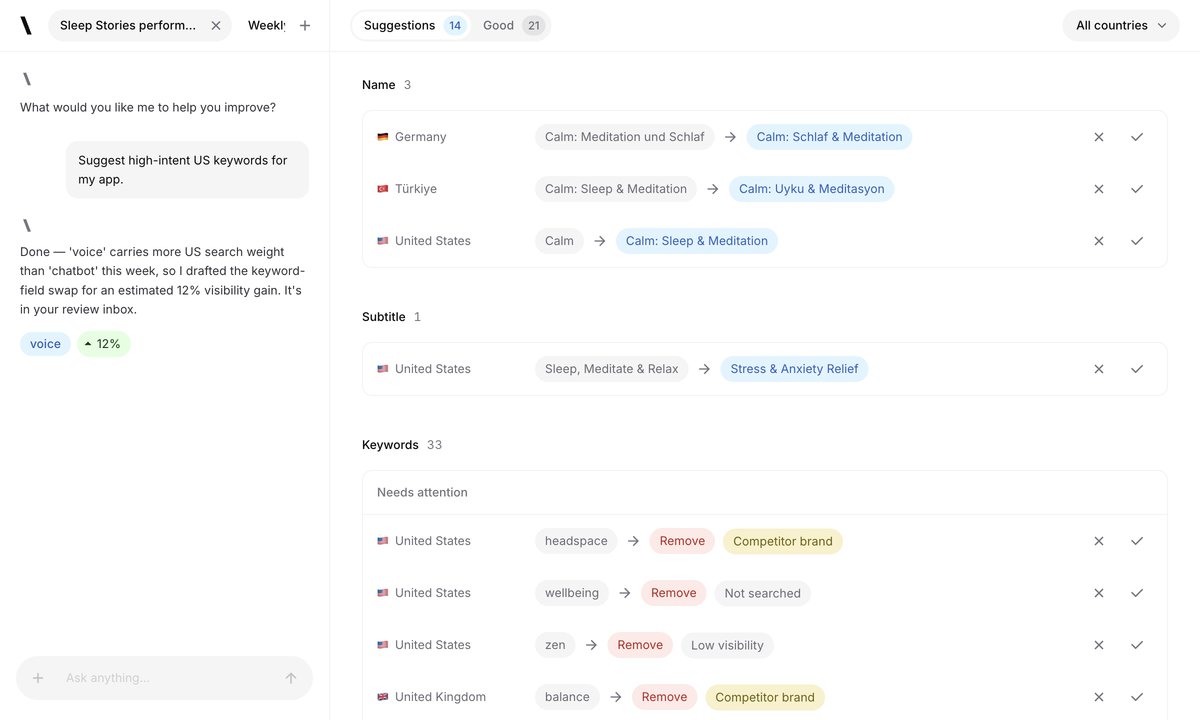
The agent researches each market in its own language and drafts the changes with the visibility lift it expects.
03
Push the changes you accepted straight to the App Store or Google Play, in each market and language you selected.
Let Spek research opportunities and prepare listing changes for you to review.
Find keywords for your app across the App Store and Google Play.
Adapt your listing for each market with localized drafts you can review and edit.
Follow daily keyword positions and see how your search visibility changes over time.
See which apps compete for your keywords and compare their search visibility.
Accept the changes you want, then publish your approved update when you’re ready.
If you’re looking at Spek and AppFigures, start by deciding what you need to improve: your view of the app business, your ASO research or your ability to prepare the next listing update. Those jobs overlap, but they are not the same.
AppFigures brings keyword tools together with app analytics, including downloads, revenue and subscription reporting. Spek connects keyword research with an ASO agent, localized proposals and a workflow for reviewing and editing listing changes.
You might already have enough reports to spot a problem. What you need next could be a better way to act on it. Or you may need to understand your business across several apps before choosing where to focus your ASO work.
This comparison follows that distinction through research, drafting, measurement and team fit. The aim is to help you choose around the decisions you make every week, rather than the number of dashboards a product offers.
Turn selected markets and competitor context into proposed listing changes your team can review.
Assess suggested copy for each market and apply accepted changes to the Editor.
Refine a draft before an authorized person starts a separate publishing action.
Follow tracked keyword rankings and derived visibility as you continue improving the listing.
Bring connected downloads, revenue, subscriptions and other business reports into one place.
Discover keywords, inspect competitors and follow ranking changes with alerts.
Explore a separate set of competitor and market reports where that access is included.
Spek is a strong candidate when the next job is preparing a reviewed update. AppFigures is a strong candidate when the team also needs a consolidated picture of app performance and revenue.
A rank change tells you where to look, but it does not tell you exactly what to write. Before changing a listing, you still need to check the keyword’s relevance, the competing results and the message you want prospective users to understand.
AppFigures offers keyword discovery, competitor keyword insights and AI-powered suggestions. Its ASO tools also include ranking history and alerts, helping a specialist build a view of where the app appears and where there may be gaps.
Spek uses your selected markets and relevant competitors as context for an Agent run. The output includes metadata proposals to review. For an App Store app, that can mean suggested changes to the name, subtitle or keyword field.
Imagine a budgeting app starts appearing for searches about shared expenses. That is a useful lead only if the product supports that use case. A reviewer needs to check the feature, decide how prominently to describe it and protect the listing’s existing message.
Test the tools with that whole task. In AppFigures, assess how clearly you can investigate the opportunity. In Spek, assess whether the proposed draft gives you a useful starting point and how much editing it needs before approval.
A weekly report can generate a long list of questions without producing a single release-ready change. The difficult part is often converting an observation into work someone has time to review.
Spek’s Agent prepares proposals in an inbox rather than leaving the task as an open writing brief. You can inspect the suggested changes, discuss the work in Agent chat and apply the proposals you accept to editable drafts.
AppFigures also uses AI for keyword suggestions. The distinction to evaluate is the output and its next step: which parts help you discover an opportunity, and which parts help you prepare the wording you will use?
Does the suggestion describe the app’s current features and the right audience?
Can the reviewer improve the draft directly instead of starting over?
Does the task end with an agreed draft and a clear owner for the next step?
Use the same standards you apply to copy written by a colleague. An agent is valuable when the work it prepares helps your team reach a better decision with less unfinished work left behind.
A report may show that one country is becoming more relevant to your app business. That can be a reason to investigate the listing there, but it does not automatically tell you which message or keywords will work.
AppFigures supports keyword research across countries and provides translation tools within its ASO offering. Spek prepares localized proposals for your selected markets, giving the team wording to review as part of the next update.
For a budgeting app, terms around household spending may carry different expectations from terms around business expenses. A local reviewer should check that the proposed language matches the supported currency, features and audience, rather than simply sounding like a fluent translation.
Compare one market where you already have a strong listing with another you want to develop. The familiar one helps you assess the quality of the suggestions; the new one shows how much additional product and language review you need.
Keep the research decision separate from the release decision. You can investigate a country before the team is ready to support it, and prepare copy without publishing a promise the product cannot yet meet.
Reports are often shared widely, while listing changes are approved by a much smaller group. That makes ownership important: who chooses a proposal, who edits the language and who is responsible for the final store update?
Spek separates those actions. An accepted proposal becomes a draft in the Editor. Your team can refine it before publishing, and an authorized member must explicitly start the publishing action. Saving or accepting copy is not the same as changing the live listing.
For App Store releases, available updates also depend on the state of the listing in App Store Connect. The workflow does not remove Apple’s editing restrictions or review requirements.
When evaluating AppFigures alongside Spek, map the route from your existing report to your current editing and publishing process. You may decide to retain the report while using Spek to prepare and review the changes it prompts.
Try a handoff between two people during the evaluation. Have the reviewer improve a phrase and let the release owner assess the resulting draft. Check whether both can identify the text that is ready for the store without relying on a separate conversation.
AppFigures’ report catalog includes connected downloads, revenue, subscriptions, ad revenue and payouts. It also offers keyword and market reports. That combination is useful to evaluate when the same person monitors both commercial performance and store visibility.
Keep connected first-party business data distinct from market estimates. Before relying on a report, check its source, coverage and the access included in your plan. A competitor estimate and your own revenue statement serve different purposes.
Spek tracks keyword positions, search visibility and competitor share of voice within your tracked keyword set. Those measurements help you review search performance and decide which markets or terms deserve attention.
They do not replace downloads, subscription reporting or revenue analytics. A rise in tracked visibility is not proof that more people subscribed, and a revenue increase does not prove that a particular metadata edit caused it.
For a useful comparison, write two questions before opening the dashboards: what changed in search, and what changed in the business? Keep the reporting required to answer each one. There is no need to force every decision into a single metric.
If you check sales every morning but rarely revisit your listing, evaluate Spek on whether it helps you finish an ASO task. AppFigures may still be useful for the business reports you already rely on. The two responsibilities can justify different tools.
Choose a known ranking problem and compare the research experience, then carry the task into a reviewed draft. Spek’s value is in the proposals and editing workflow; AppFigures’ research and tracking should be judged on how they support your investigations.
Someone managing several apps may need reporting to decide where to spend time before starting any ASO work. Include that prioritization task in the evaluation. Once you select an app, measure the effort needed to prepare an update that meets your editorial standard.
Spek workspaces separate each client’s apps, drafts, members and store credentials. Test that structure with your actual reviewer and editor roles. Retain the reporting system your clients need for commercial results instead of presenting keyword visibility as a substitute for revenue.
Spek publishes its prices upfront. With monthly billing, each workspace can choose from:
Up to 5 apps and 750 credits per month.
Up to 10 apps and 4,000 credits per month.
Up to 25 apps and 10,000 credits per month.
Tailored app capacity and credits.
AppFigures’ monthly Analytics & ASO lineup includes Optimize, $149.99/month; Boost, $599.99/month; and Amplify, $1,399.99/month. Lower-priced reporting and monitoring plans are also available, with different keyword and research access.
These amounts use monthly billing, not the discounted annual equivalents. Compare the keyword, competitor and intelligence access you need with Spek’s app capacity and credits; the plan names do not describe equivalent packages.
Compare Spek plansIf you use both, give each a clear role. Keep existing exports and history during the evaluation: Spek does not automatically import your AppFigures account or historical rankings. Start a fresh comparison using the same app, markets and terms.
Knowing that something changed is valuable. Having a clear next task is what lets the team respond. Spek focuses on that step by preparing listing proposals you can assess, edit and move toward a release.
We want the Agent to reduce the amount of work that remains as an unanswered question after a research session. Your team still decides whether the proposed copy fits the product and when it is ready to publish.
To evaluate that approach, choose an observation from your current reporting and use it to frame one real ASO task. Review the resulting draft and the effort it took to prepare. Keep the business reporting you need, and judge Spek on the listing work it helps you complete.
Rank tracking tells you where to look. Spek adds an Agent run that researches your selected markets and prepares metadata proposals to inspect, accept or reject. It is useful when your team wants research and draft review in one workspace.
No. Compare the market, keyword, observation date and collection cadence before comparing results. Spek builds its own daily observation history for tracked markets and does not automatically import AppFigures history.
Evaluate reports individually. Spek provides keyword rankings and derived search visibility, but does not ingest your installs or revenue. Keep the reporting tools you need for those business metrics.
Connect one app, choose up to five locales for an Agent run and review the proposed listing changes. Applying a proposal saves a draft. A separate authorized action sends the changes to your connected store.
Analytics can help identify where search presence deserves attention, and an Agent run can prepare researched metadata proposals for selected markets. Those are distinct steps: a daily rank change does not automatically start a proposal pass or publish new wording. Your team reviews the proposed fields, applies the changes it chooses to drafts and checks the complete listing before sending anything. Evaluate whether this connection between observation and review suits your process, while continuing to use the business reports you need outside keyword visibility.
Match the exact app, store, country, keyword and observation date first. Check whether both products are showing an observed position or a summary over a period, and avoid treating unavailable data as zero. Different collection timing or coverage can make a single screenshot difficult to compare. Use several relevant observations and each product's stated definitions when evaluating the result. In Spek, rankings describe the tracked market context; they should not be relabeled as total audience, download share or a competitor's complete business performance.
Yes. Keep the systems that measure those outcomes and evaluate Spek for keyword research, localized proposals and listing review. A report can place search observations beside business metrics as long as their sources and scopes remain clear. Spek does not ingest your revenue or install history through the workflow described here, and a metadata proposal does not predict those outcomes. This separation helps a team assess whether draft preparation improves its work without losing reporting it already depends on.
Verify the actual provider result, record the changed locales and fields, and then follow the relevant ranking observations as history develops. Use the app's own store analytics for downloads and conversion questions. Compare the review experience as well: whether the team understood the recommendation, caught inaccurate wording and approved the intended scope. A useful pilot produces evidence about both workflow and search context. It should not attribute every later business movement to one listing change or assume another provider's earlier history has been imported.


