

01
Connect yourApp Store account
Bring your own App Store Connect key. Spek uses the official token API, so no Apple ID password or login is handed over.
Spek preview in front. Select the other card or its product name to bring it forward.
Spek helps over 500 apps grow. Across every stage of growth.
| Features | Spek | Asodesk |
|---|---|---|
| Agentic ASO with a proposal review inbox | Available | Not available |
| Agent proposals applied to Editor drafts | Available | Not available |
| Multi-market ASO workspace | Available | Available |
| App Store keyword research | Available | Available |
| Keyword rank tracking | Available | Available |
| Competitor keyword insights | Available | Available |
| Multi-market keyword research | Available | Available |
| Historical keyword rankings | Available | Available |
| Keyword search demand estimates | Available | Available |
| Metadata editing workspace | Available | Available |
| Keyword-level download estimates | Not available | Available |
| App review management | Not available | Available |
“With Spek, we can turn keyword opportunities into listing updates in one place, with our team in control of what goes live.”

01
Bring your own App Store Connect key. Spek uses the official token API, so no Apple ID password or login is handed over.
02
The agent researches each market in its own language and drafts the changes with the visibility lift it expects.
03
Push the changes you accepted straight to the App Store or Google Play, in each market and language you selected.
Let Spek research opportunities and prepare listing changes for you to review.
Find keywords for your app across the App Store and Google Play.
Adapt your listing for each market with localized drafts you can review and edit.
Follow daily keyword positions and see how your search visibility changes over time.
See which apps compete for your keywords and compare their search visibility.
Accept the changes you want, then publish your approved update when you’re ready.
If you’re comparing Spek and Asodesk, you may already have a keyword list and an idea of what needs attention. The next question is how your team turns that research into metadata, reviews the wording and prepares an update for the store.
Asodesk brings keyword research, tracking and metadata preparation together with additional tools for reviews and organic analysis. Spek connects research with an ASO agent, localized proposals, a review inbox and editable drafts.
Both products reach beyond showing keyword positions. Asodesk has a Text Metadata Builder, so the choice should not be framed as editing versus no editing. The useful comparison is how the work is prepared, how people review it and what remains before a release.
We’ll follow those steps using the needs of developers, ASO specialists and teams managing several apps. Start with the part of the process that most often delays your next listing update.
Run research for your selected markets and receive metadata proposals your team can inspect.
Accept or reject suggestions, then refine accepted changes in the Editor.
Prepare market-specific listing copy for review without starting each draft from a blank page.
Ask questions about your app’s ASO work and discuss the changes you are considering.
Build and manage keyword sets, investigate competitors and follow positions over time.
Use Text Metadata Builder with keyword information, saved metadata sets and localization support.
Evaluate its organic reporting and review-management products alongside research.
Spek is worth testing when you want the Agent to prepare proposals for a team review. Asodesk is worth testing when you want a research and metadata-building toolkit around a specialist-led process.
A useful keyword set needs a purpose. It may support a new feature, a clearer description of the app or an expansion into another market. Without that context, the research can keep growing while the listing stays unchanged.
Asodesk’s ASO tools include keyword tables, competitor research, suggestions and ranking analysis. Its Text Metadata Builder connects metadata preparation with the keyword table, helping a specialist work on copy with the research available.
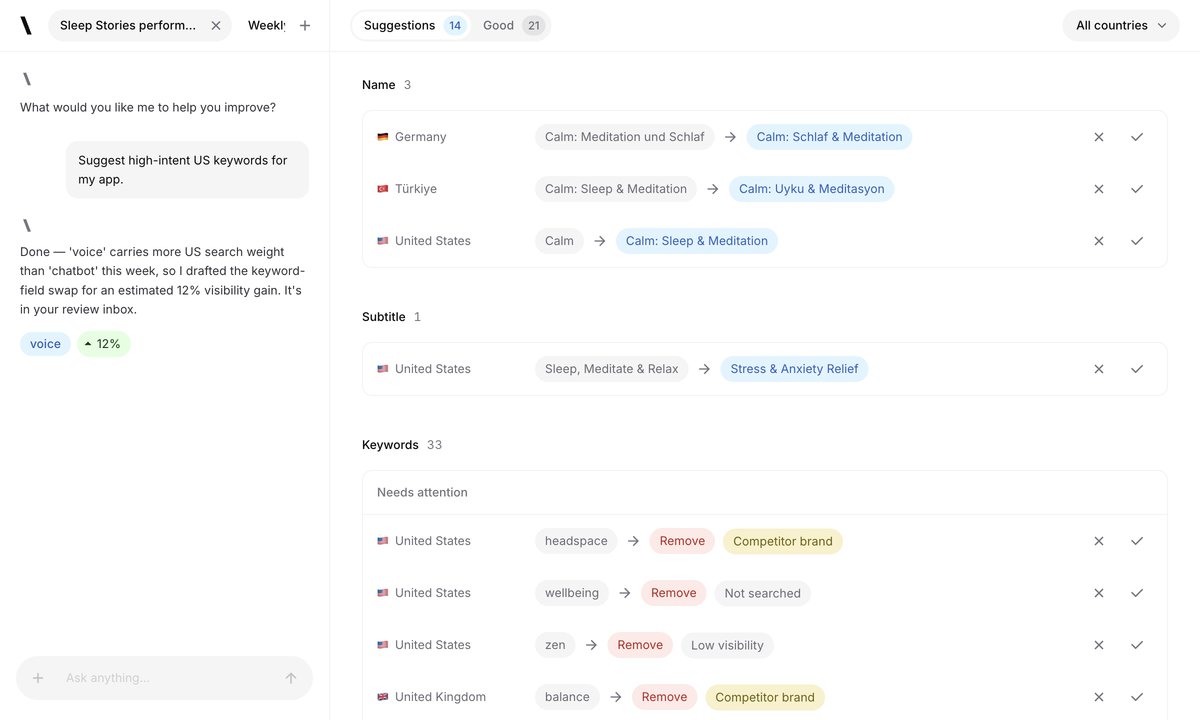
Spek’s Agent researches the selected markets and prepares suggested changes for your review. For an App Store listing, proposals can address the name, subtitle and keyword field. You decide which suggestions describe the app accurately enough to carry into a draft.
Consider a photo editor adding a background-removal feature. Research may reveal relevant searches, but the final wording must still fit the app’s broader purpose. The reviewer needs to decide how much space to give the new feature and which existing message to preserve.
Use that kind of focused brief in a trial. Compare how each tool helps you investigate the opportunity and prepare a draft. The result should be wording you can defend to the product team, rather than a longer list of terms to sort later.
A metadata editor gives you a place to write. A prepared proposal gives you a specific change to assess. Both are useful, and the amount of preparation your team wants from the tool will influence the better fit.
Asodesk’s Text Metadata Builder supports metadata sets, highlights potential issues and lets you compare new text with existing metadata. Those are substantive preparation features, not just a field for pasting finished copy.
Spek’s Agent prepares suggestions in a review inbox. You can inspect the proposed wording, discuss the work in Agent chat and apply accepted proposals to Editor drafts. The team still brings the product knowledge needed to judge the suggestions.
Assess how much usable copy is prepared before the editor begins their review.
Check whether the reviewer can explain why a suggestion should be kept or changed.
Measure the editing and coordination needed before the draft is ready for approval.
Try a proposal you would partly reject. A tool should still be useful when your product judgment calls for different wording, not only when you accept the first draft unchanged.
The right keyword in one country may not express the same user need in another. Localizing a listing means checking search language, product availability and the message your team wants to communicate together.
Asodesk’s builder supports additional localizations, description translation and saved metadata sets. Spek prepares localized proposals for the markets selected in a run. Compare the resulting copy with someone who can judge both the language and the app.
For a photo-editing app, a phrase that suggests professional retouching may be misleading if the product is designed for quick social posts. A literal translation can preserve the words while missing the intended audience. That is an editorial decision your team still needs to make.
Choose one market with an established listing and one new market during the evaluation. Use the first to judge suggestion quality and the second to understand how much local review is required before the text is ready.
Then follow the correction process. Check that the person improving a translation can identify the right draft, preserve approved product terms and hand the final wording back to the person responsible for the release.
Preparing copy and publishing copy are different responsibilities, even when one person performs both. Teams need a clear point at which the exact wording is approved for the store.
Spek separates proposal review, editing and publishing. You accept the changes you want, refine them in the Editor and have an authorized member start publishing explicitly. Accepting a proposal does not automatically change the live listing.
For App Store work, the app’s state in App Store Connect affects which updates are possible. A draft does not bypass Apple’s editing or review requirements. Include that release context when assessing how the workflow fits your team.
Asodesk supports metadata preparation and saved sets. In an evaluation, ask to see the next steps for your chosen store and setup: who approves the final text, how it reaches the store and what needs to happen outside the metadata workspace.
Try preparing a change before the release is ready. Then ask the release owner to inspect the approved draft later. The goal is to see whether the work stays understandable through the handoff, without requiring the editor to reconstruct which version was intended.
Research metrics help you choose where to investigate. Reporting helps you understand what changed after you acted. Neither should be treated as a guarantee that a particular keyword or draft will produce growth.
Spek’s Analytics follows keyword positions, derived visibility and competitor share of voice across the terms you track. It gives your team a way to inspect changes in selected markets and decide which areas need another look.
Those measurements do not represent all organic traffic, installs or revenue. A better rank can be encouraging without proving that a metadata edit caused a commercial result.
Asodesk’s toolkit includes Organic Report and estimated keyword-related demand and installs. Those estimates provide a different research view from tracked positions. Check the definition and scope of each metric before putting figures from separate tools side by side.
During the evaluation, align the app, store, country, keyword and date range. Then write down what decision each report supports. Use your store and business reporting for actual acquisition and revenue results, and avoid replacing those measures with a visibility score.
Spek is useful to evaluate when research and writing compete with product development. Give the Agent a real listing task, then judge whether its proposals help you reach an acceptable draft in the time you have available.
A specialist may want detailed control over the keyword set and metadata-building process. Asodesk’s research tools and builder deserve a close look for that workflow. Evaluate Spek on how well its proposals support your standards and how easily you can refine the output.
If review management is part of the purchase, assess Asodesk’s relevant tools separately with the people who use them. A metadata review inbox serves a different purpose from organizing and replying to customer feedback.
Spek workspaces keep each client’s apps, drafts, members and credentials together. Include both an editor and a viewer in the trial. The most useful test is a real handoff: prepare the draft, have someone else review it and confirm who can start publishing.
Spek publishes its prices upfront. With monthly billing, each workspace can choose from:
Up to 5 apps and 750 credits per month.
Up to 10 apps and 4,000 credits per month.
Up to 25 apps and 10,000 credits per month.
Tailored app capacity and credits.
With the one-month ASO billing option selected, Asodesk lists Pro, $59/month; Guru, $199/month; and Power, $449/month. Its reviews products and additional options have separate packaging.
These figures use the monthly option rather than annual or introductory offers. Compare the required ASO features and allowances with Spek’s app capacity and credits, and include reviews access separately if your team needs it.
Compare Spek plansYou can evaluate Spek while keeping the research process you already use. There is no automatic import of your Asodesk account data or ranking history, so retain existing exports and use the same app and markets for a fresh comparison.
ASO work often slows down between understanding an opportunity and writing the first draft. Spek gives that step a concrete output: proposed listing changes that your team can inspect and improve.
The Agent prepares the work, while editors and release owners keep control of the wording and the publishing decision. This gives product knowledge a clear place in the process instead of treating a research metric as permission to change the listing.
Bring a specific feature or audience to your evaluation. Review the proposals, change the wording where needed and assess the final draft with the person who would approve it. That is how to judge whether the workflow helps your team make progress.
Spek is designed for teams that want researched keyword choices delivered as reviewable metadata proposals. You can inspect each change, accept it into a draft and control the final publishing action from the same workspace.
Yes. Asodesk documents a Text Metadata Builder. Editing is a shared capability; the useful comparison is how each product helps your team choose keywords, prepare localized text and review changes before they reach the store.
Your app has a shared list of tracked competitors. Research uses each storefront’s own listing and search evidence for those apps. Adding a competitor in one market does not copy that market’s keyword data into another.
There is no automatic account or history migration. Use your existing research as context while evaluating a fresh Spek run for one app. Spek prepares its own researched proposals and builds ranking history from its own observations.
Review both the choice of terms and the final wording that users will encounter. In Spek, keyword context supports a proposal, while the review inbox and Editor help turn the chosen direction into an approved draft. A competitive keyword is not useful if it misrepresents the product, and a fluent sentence is not enough if it ignores the intended market. Compare these steps on the same app and locales. Metadata editing is a shared capability in this comparison; the practical question is how the full process serves your team.
Use it as context for the questions you want to investigate, while keeping its source and market scope identifiable. Spek does not automatically migrate Asodesk account data or history, and its proposals are prepared from its own supported research context. Compare the meaning of estimates before treating numbers from two products as interchangeable. Your prior work can still help identify important audiences, known brand requirements and listing decisions that deserve attention during the pilot without being presented as data Spek has imported.
Review a metadata proposal, apply the direction you choose and continue editing the resulting text in Spek's Editor. Check the field limit, product accuracy and relationship to the rest of the locale's listing. The team remains responsible for the final public wording, so an accepted proposal can still need language or brand refinement. Publishing is a separate authorized action governed by the store's current prerequisites. Evaluate whether that handoff gives your editors the right balance of useful research and practical control.
Record the selected market and actual published fields, then review the tracked ranking observations over an appropriate period. Keep the keyword set and source clear when comparing earlier reports. Visibility describes search presence and does not establish downloads, revenue or conversion. A move can be informative even when the team ultimately keeps the current metadata. Judge the work using the accuracy of the decision, the review process and the measured search context rather than assuming a fresh keyword list must guarantee immediate growth.


